 Docs
Docs
Whisper Guard
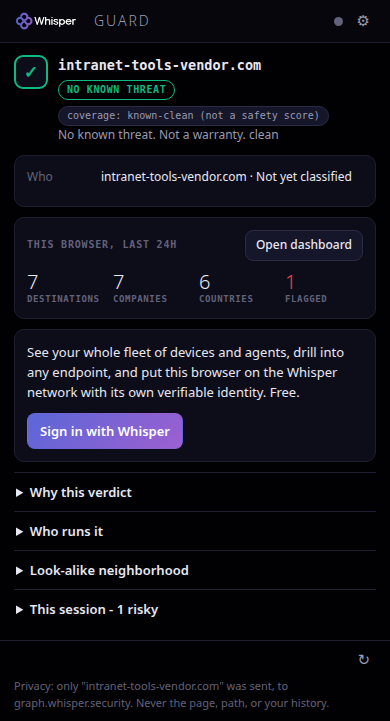
The Whisper security graph, native in your browser. It starts protecting the instant it installs, and only a site's name is ever checked. Never the page, never the path, never your history.
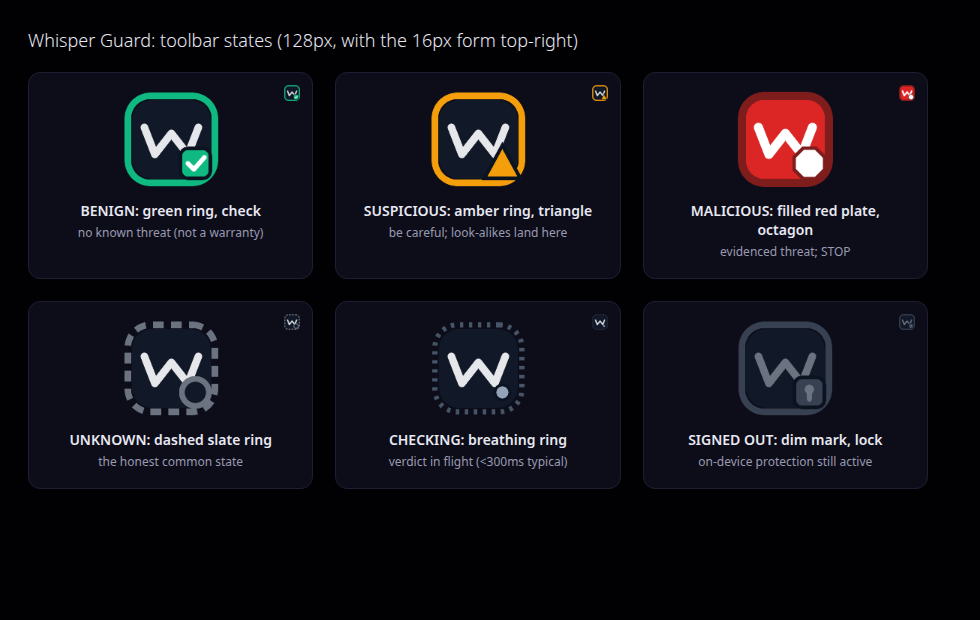
Whisper Guard is the browser client of the Whisper security graph: a Manifest V3 extension for Chromium (Chrome, Edge, Brave, Opera, Vivaldi) and Firefox, MIT-licensed at github.com/whisper-sec/whisper-guard. One background service worker drives three surfaces over the graph: the toolbar mark, a popup card, and a full-tab, console-style dashboard, with an optional on-page banner. It carries the Whisper logo and the console's dark-violet theme, so it reads like a room of the console rather than a bolt-on. It is two-tier throughout: the keyless half is a complete product, and signing in unlocks your fleet and lets this browser become an endpoint of its own.
Install
Whisper Guard is not yet listed in the Chrome Web Store or Firefox Add-ons. Until it lands there, the built extension loads in under a minute:
git clone https://github.com/whisper-sec/whisper-guard && cd whisper-guard
npm ci && npm run build
Then in Chrome, Edge, Brave, Opera, or Vivaldi: open chrome://extensions, enable Developer mode, choose Load unpacked, and pick dist/chromium. In Firefox: about:debugging#/runtime/this-firefox, Load Temporary Add-on, pick dist/firefox/manifest.json. Safari needs Apple's converter and a Mac; it is planned, honestly parked, and tracked in the repository.
On your phone
The same two-tier Guard is coming to iOS and Android as a native app: keyless look-alike detection and public identity/RDAP verification on-device, plus your live graph verdict and fleet once you sign in. Neither is available to install yet; until it lands, the browser extension above is the way to run Guard today.
Two tiers, per Postel's Law
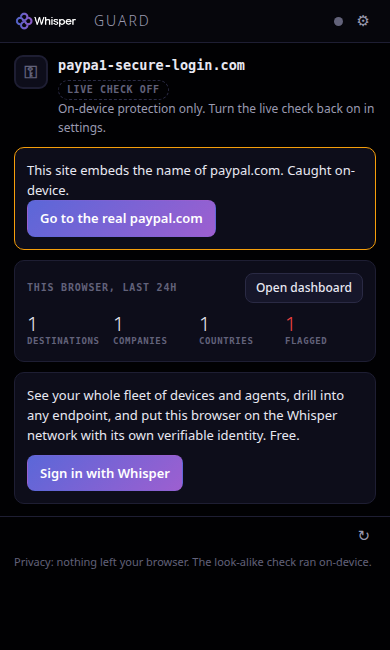
Like every Whisper integration, Guard delivers real value with no account at all, and the full graph, your fleet, and browser-as-endpoint egress when you sign in.
| Tier | What you get | Auth |
|---|---|---|
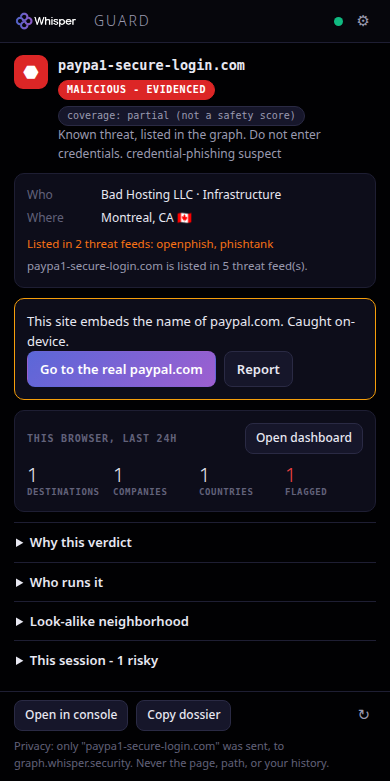
| Keyless | A graph-composed verdict on every site (safe, suspicious, evidenced-malicious, or an honest UNKNOWN), on-device look-alike warnings for 800+ heavily phished brands, right-click pre-click link vetting, and the This browser dashboard of where this browser has been going, enriched through the graph. Only a bare hostname is ever sent, only to the graph. | none |
| Signed in | Your whole fleet in one view (every device and agent on your Whisper account), a per-endpoint drill with an explainable identity-health score and destination receipts, one-click reporting and a copyable dossier, and the opt-in switch that turns this browser into an endpoint with its own routable Whisper identity. | free sign-in, RFC 8628 device flow |
Protection, not just look-alikes
v1 warned about look-alikes on device. v2 keeps that and adds the graph, keyless: every site resolves to one composed, reconciled verdict rather than a single lookup. whisper.assess is the only gate that blocks or warns (popularity and reputation feeds inform it, but a popular site is never treated as a threat). whisper.identify runs through an owner and category inference chain to say who answers for a name and what kind of thing it is. whisper.explain gives the feed-cited "why", with listings and dates, rendered only when the graph actually supplies them. whisper.variants surfaces registered look-alikes confirmed against the graph, and whisper.history gives the domain's age. All of it folds into the one toolbar mark, the popup card, the on-page banner, and the warning-page receipts.
Held before it lands
A verdict that arrives after the page has loaded is a verdict that arrived late. Guard catches the click itself: following a link that leaves for a different registrable domain, or submitting a form that posts off-origin, is held in the capture phase while that destination's name is checked. Evidenced malice gets an inline panel with the band, the label, the coverage and both exits, drawn in a closed shadow root so the page can neither style it nor read it. The destination is never contacted and nothing you typed is sent anywhere. Everything else resumes exactly as it would have: the same tab, the native new-tab or new-window disposition of a middle or modifier click, the page's own click handlers, the form's own validation.
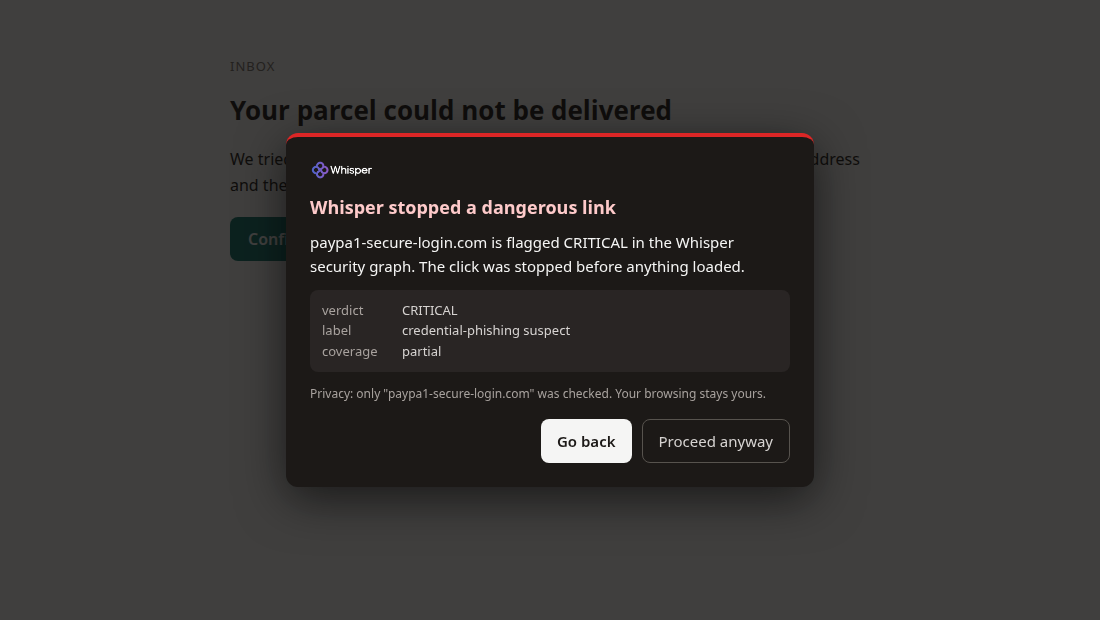
Two properties make it safe to leave on. It is cache-first, so a destination the graph has already answered for costs no network at all. And it fails open on a hard budget: if the graph is slow or unreachable the click simply proceeds. Guard never turns an outage into a blocked browser.
It also needs no broad host permission. The layer arms wherever the browser already lets Guard run: on every eligible page under the Active Shield grant, and otherwise on the one tab you invoked Guard on. A held destination additionally gets a session-scoped block rule for that single host, so the same destination cannot slip through in another tab, and every such block is listed in the popup with a one-click clear. It is never a dead end.
How loud Guard is allowed to get
One table decides how loudly any finding may speak, on every surface: silent, ambient (the toolbar mark and a single badge pulse), pre-emptive (hold the action and show the receipts first), conversational (a dismissible word on the page), blocking (the full-page stop). Most of that table is silent, and the entire no-evidence row is silent, which is where the overwhelming majority of browsing lands. De-noising is never hiding: the raw verdict rides the tab state verbatim and is one popup click away. The table has a column per moment, and answering one moment does not answer the others: click through a known-threat warning and Guard will not re-block it, re-banner it or ask again, but the caution at the password field still appears once, because typing a credential into that site is a different moment with a different stake. A softer verdict you waved through stays fully silent. What Guard handled for you lands in a calm card in the popup, counted by category and never by site, with no toast anywhere, because the extension holds no notifications permission at all.
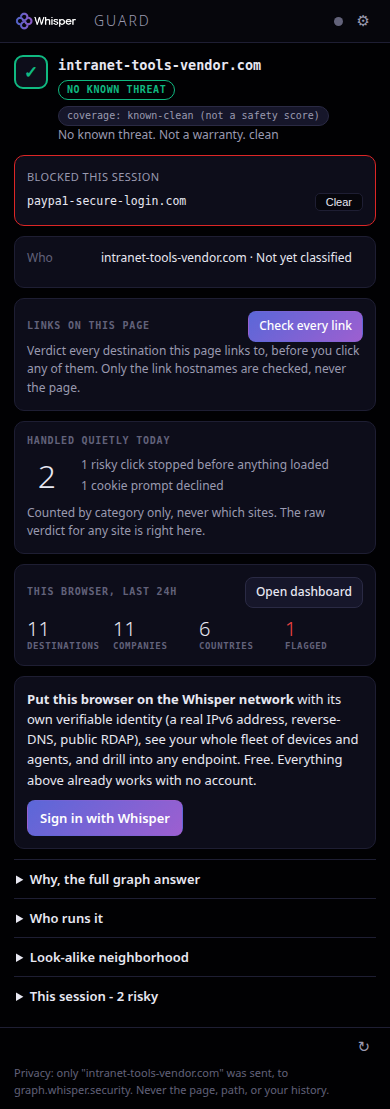
Cookie prompts, declined for you
The banner that greets you on half the web is a consent question with a pre-set answer, and the private answer is always the one that takes an extra click. Guard takes that click for you: where its on-page layer runs, a consent banner is answered with its own reject or necessary only control, so the page starts in its most private configuration. It happens on-device and nothing about the page is sent anywhere; the decline runs the site's own consent handler, exactly as your click would have.
It is deliberately timid, because a wrong click here is worse than no click. Guard acts on a consent platform's own published reject control, on a decline-labelled button inside a known consent root, or, in the generic case, only when a banner-sized container says cookie, consent or GDPR outright and offers an accept next to the reject, since a genuine cookie banner always does. A lone "Decline" in a session-expiry or notifications dialog has neither, and is left alone. At most one click happens per page load, it is never an accept, and one switch in settings turns the whole thing off.
Honest scope, because this is where such features usually overclaim: Guard reads the top frame only. A consent wall that a site renders inside an iframe or a shadow root, which several large publishers do, is out of reach and is left untouched rather than guessed at. Every decline is counted in the calm card above, by category and never by site.
Where your devices go
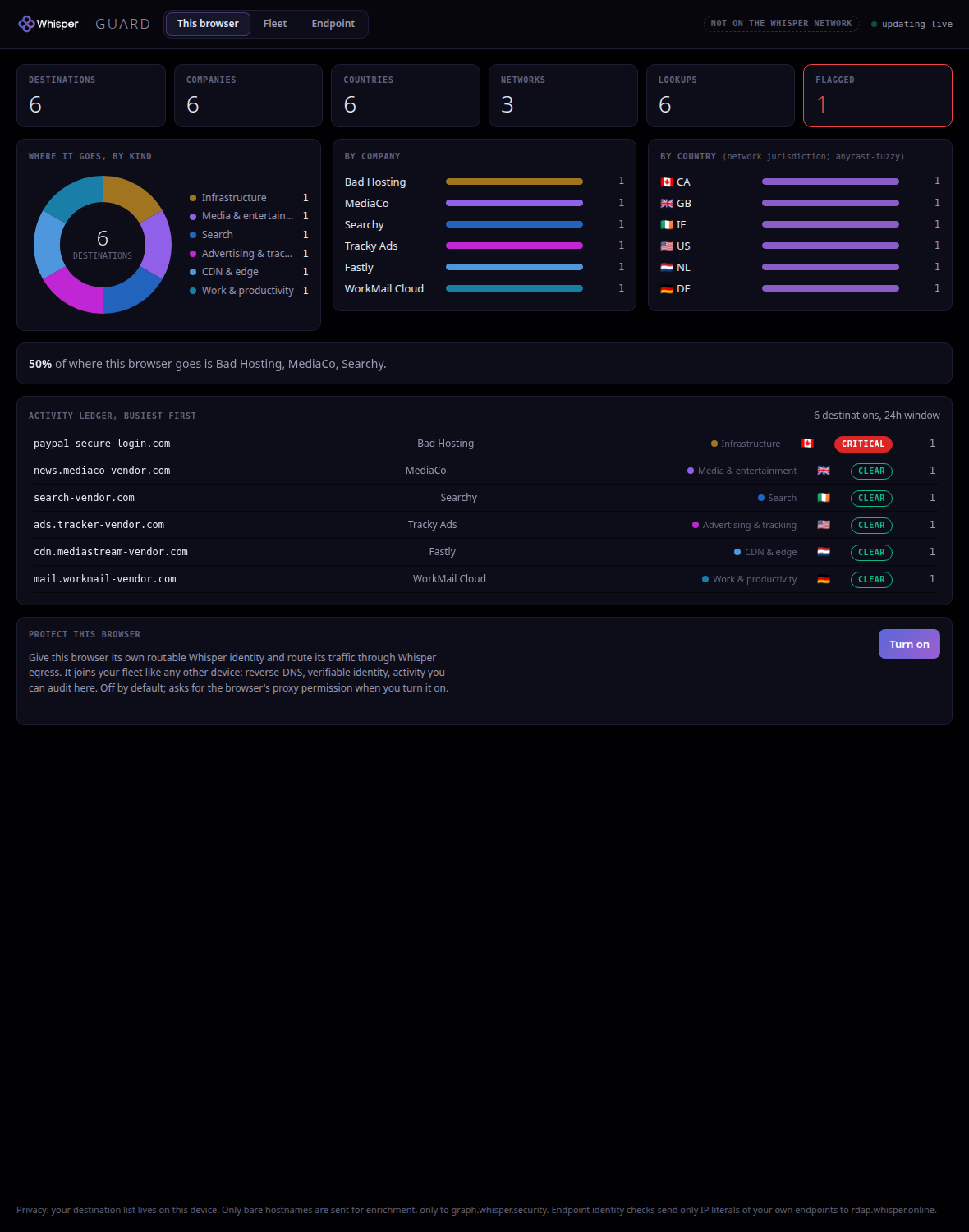
The keystone of v2 is a full-tab dashboard that answers a question a browser has never answered honestly: where does my traffic actually go? The This browser view is keyless. It is built from the on-device navigation log and enriched by one batched graph call into destination, company, country and network tiles, a category donut, company and country breakdowns, a concentration callout, and an activity ledger that updates live per navigation. It needs no account and no new permission; the on-device list of where you went never leaves the device, and only bare hostnames are sent to the graph.
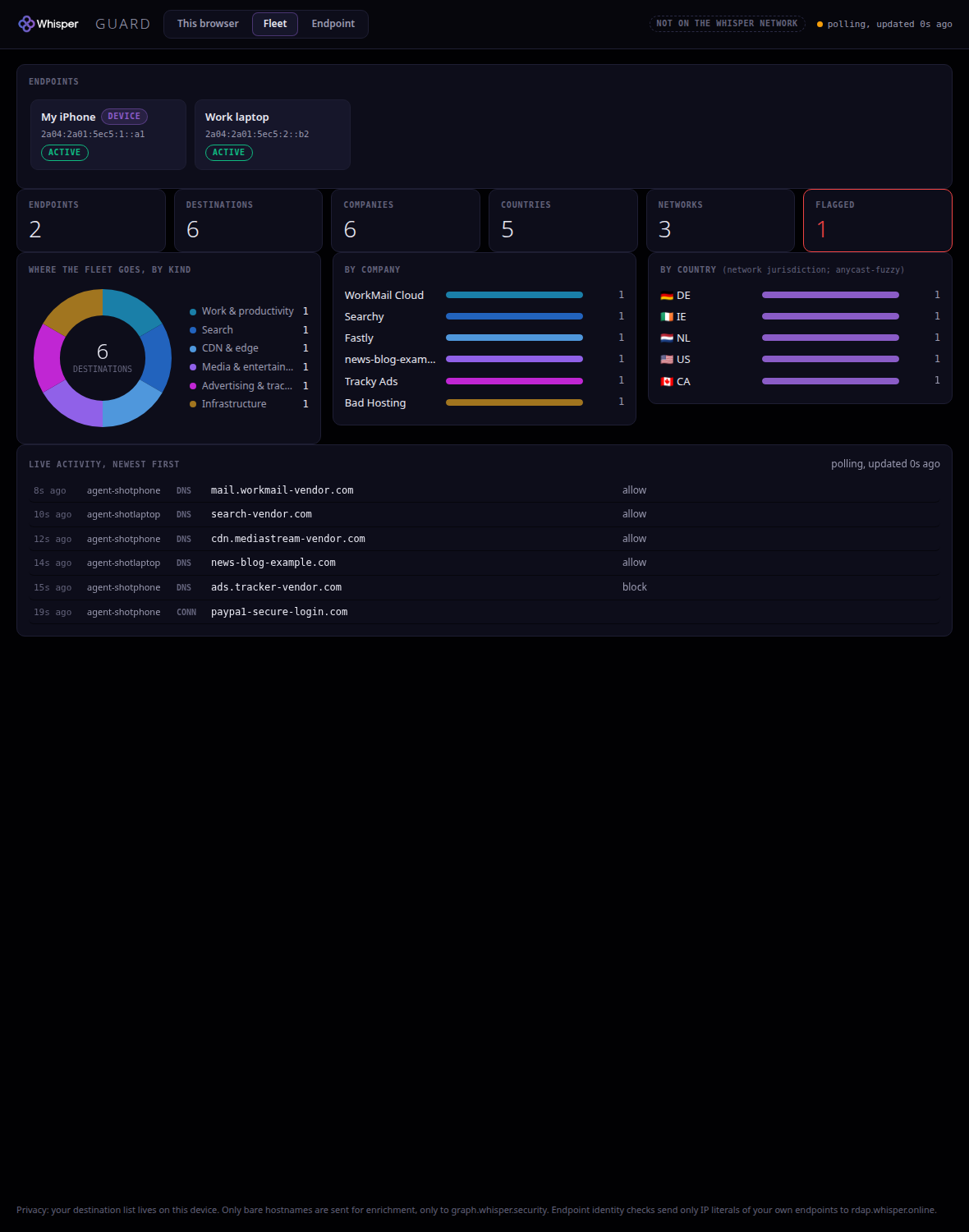
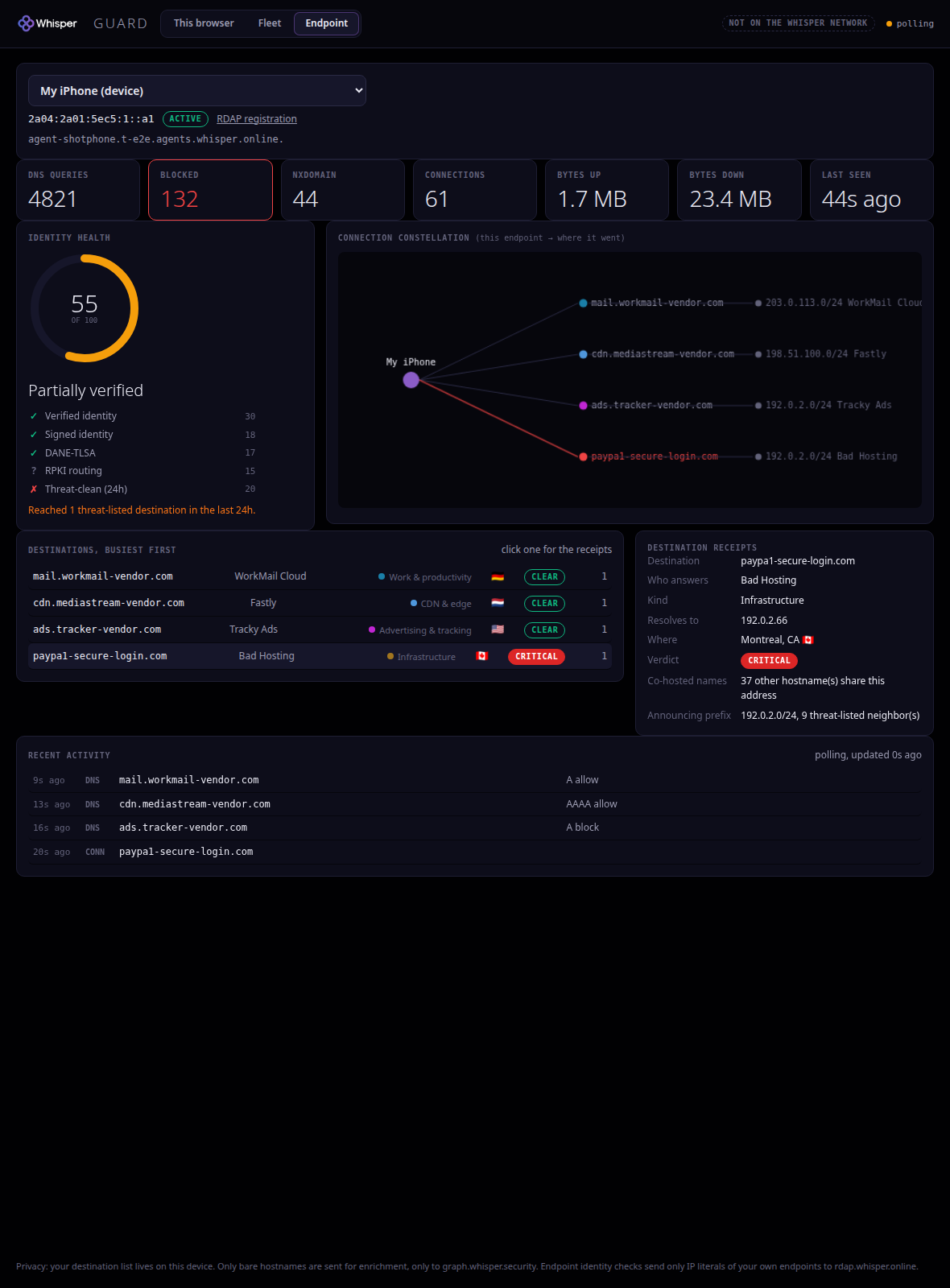
Sign in and the same room grows a Fleet view: every device and agent on your Whisper account in one place, with a roster (whisper.agents({op:'list'})) and merged last-24h destinations across the fleet (per-device op:'logs'). Drill into any endpoint for live counters, an explainable identity-health score (each factor met, unmet, or unknown, never a black box), the connection constellation from the endpoint to where it went, and destination receipts with co-hosting fan-in and announcing-prefix threat neighbours, straight from the graph. An RDAP provenance link anchors every identity. It is read-first: it shows you the fleet, it does not silently change it.
Turn this browser into an endpoint
One opt-in switch, off by default, gives this browser its own routable Whisper identity and routes its traffic through Whisper egress, so it joins your fleet like any other device. It registers once (whisper.agents({op:'register'}) with a stable label; an existing device with that label is adopted, never duplicated), then asks the graph for an authenticated egress endpoint bound to its /128 (op:'connect'), then installs one HTTPS-CONNECT route. There is a single code path for both engines: Chromium uses fixed_servers with an onAuthRequired credential, Firefox uses proxy.onRequest with a proxy authorization header. Turning it on requests the browser's proxy permission on your click; decline it and nothing changes.

/128, and the honest limits are stated in place.The limits are stated, not hidden. The proxy setting is profile-global: every window of the browser profile rides the route, so a profile is one owner, not one tab. It is single-owner: only one extension can hold the browser's proxy at a time, and if another extension holds it, Guard says so plainly and asks you to disable that one first. WebRTC is hardened to proxied-only (disable_non_proxied_udp) on Chromium only, so a peer connection cannot leak your real address around the route; Firefox exposes no such control to an extension, so on Firefox that specific hardening is not available, and the extension says so rather than papering over it.
Honest realtime
The This browser view is genuinely live: the ledger and tiles update per navigation as you browse. The Fleet feed cannot be a live wire from a background service worker, so it is honest polling instead: a scheduled refresh plus any open dashboard tab, with the cursor and ring persisted and the feed labelled "polling, updated N seconds ago". It degrades in the open, live to polling to offline, and never dresses one up as the other.
Honest scope
The on-device detector catches look-alikes of major brands that you navigate to. It does not catch compromised legitimate sites, brand-new domains on shared hosting, or threats on links you never open. The graph verdict covers far more and still reports UNKNOWN for most of the web, because that is the truth: absence of evidence is shown as absence of evidence, in slate, never dressed up as green. Coverage is shown as a category (known-clean, partial, no-data), never as a percentage, and a clean verdict is never sold as a warranty.
The privacy model, verifiably
Guard only ever sees a site's name, never your history and never the page. The live safety check sends the hostname of the page you visit to exactly one endpoint (graph.whisper.online), whether or not you have an account, and nothing else: no path, no query, no content, no form data. That same host carries the keyed control plane, your own fleet roster and enrollment, when you are signed in. It is one host for both, not two: the keyless check and the keyed control plane are separate arms of the same front door, so signing in adds what the host may answer and does not add a second place your browsing goes. Hostnames answer the check and are not retained to build a browsing profile. The on-device look-alike protection sends nothing at all, and one switch turns the live check off entirely, leaving on-device protection only. Endpoint identity checks send only the IP literals of your own endpoints to rdap.whisper.online. The on-device list of where this browser has been never leaves the device. No telemetry, no analytics, no sync. Internal pages, localhost, private addresses, and IP literals are never checked at all.
This is not a promise, it is a tested invariant: the e2e suite points the whole browser at a capture proxy, visits https://host/very/secret/path?token=..., and asserts that the complete captured network contains exactly one graph call whose only browsing datum is the bare hostname, and that no captured request anywhere carries the path or query. The suite ships in the repository and runs against the real built extension.
Sign in without ever seeing a key
Sign-in is the same RFC 8628 device flow the whisper CLI uses: the extension requests a code, opens the console approval page, and the credential lands in local extension storage when you approve. You never see or paste an API key. A paste-a-key field exists in settings as the enterprise fallback. Signing out wipes the credential, and the toolbar dims back to the keyless tier instantly.
Active Shield, opt-in
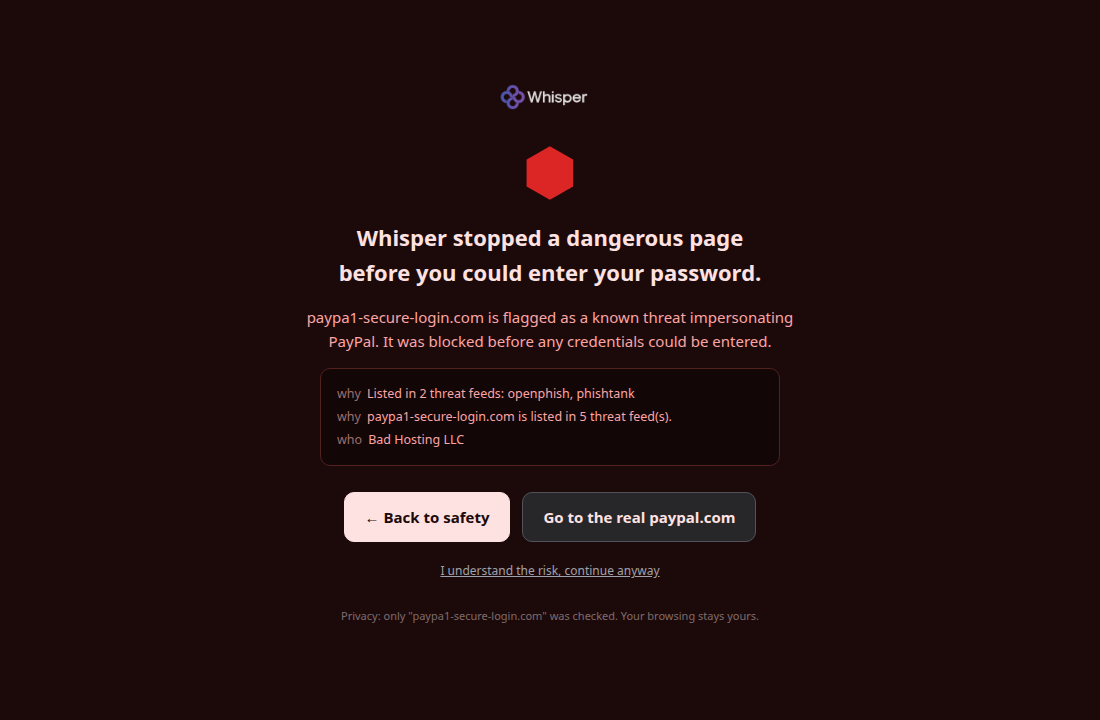
Guard holds no broad host permission by default, and there is no standing content script: every on-page layer is injected programmatically and only where the browser's own permission model already allows it. One toggle in settings, backed by the browser's own consent dialog, turns on Active Shield, which extends that reach to every page and adds the page-drawing warnings: a full-page stop before known credential-phishing pages (a DNR rule blocks re-visits before the request even leaves; a first visit is moved to the warning the moment the verdict lands), a slim amber banner on look-alikes that never blocks, and a caution when a password field gains focus on a flagged site. Decline the permission and everything else keeps working, pre-emptive interruption included.
Proven end to end
Guard ships with Playwright suites that load the real built extension: hermetic tests against a full-capture proxy for the toolbar states, the popup, the device flow, fail-open, and the privacy invariant; suites for the three dashboard views and for the realtime feed; and a hard dual-engine egress proof that the routed /128 matches the browser's own identity, that it joins the roster, and that the keyless RDAP identity check works. A redacted-key suite runs against the production graph (fleet, per-endpoint, and RDAP all real, with the key redacted in every artifact), and web-ext AMO lint passes at zero findings, with the full screenshot gallery captured by the suite. If the graph is slow or unreachable, the mark shows UNKNOWN, on-device protection keeps running, and browsing is never blocked: fail-open is a tested path, not a hope.
Source and next steps
Source, screenshots, and the e2e suite: github.com/whisper-sec/whisper-guard (MIT). The graph surfaces it renders are the same ones documented at Graph & cognition; the fleet and egress it drives are the same control-plane ops behind Control plane; the sign-in console is the same account behind Account & keys.
Next: Verify an agent for the keyless verification surface · Devices for the same fleet in the console · Integrations for every other way in.